

Need it installed?
We set it up and configure it on your server — fixed price after a short quote.
SEO Pro — paid plugin for S-Cart / GP247
English | Tiếng Việt | 日本語
SEO Pro helps shops with many products do SEO faster and see what Google shows, right in the admin. S-Cart already gets technical SEO right from the start (titles, descriptions, canonical, sitemap, structured data, redirects when an address changes). SEO Pro adds work at scale and Google's own figures.
Paid plugin. A valid license for the website's domain is required — see License.
What SEO Pro adds
Five screens in the SEO menu group:
| Screen | What it does |
|---|---|
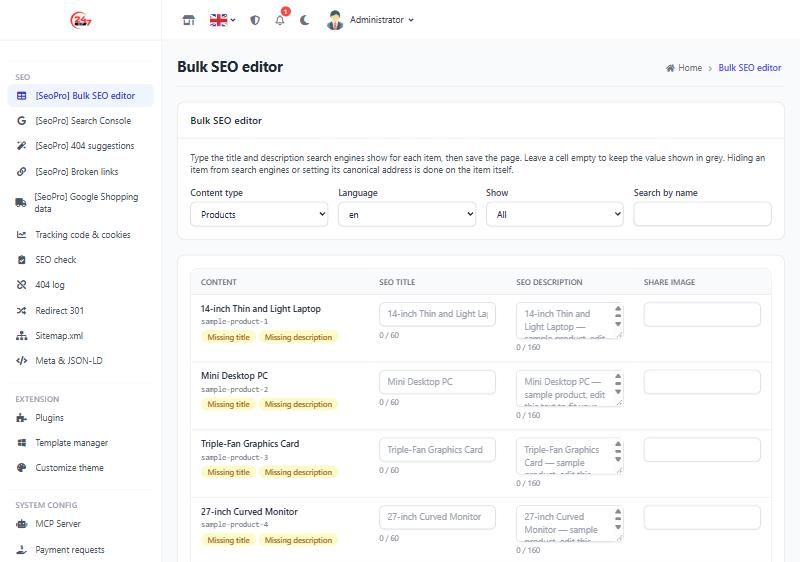
| Bulk SEO editor | Edit the title, description and share image of hundreds of products, categories, brands and pages on one table. Filter missing, duplicate, too long and too short values. Empty cells show (in grey) what Google sees. Undo the last save. |
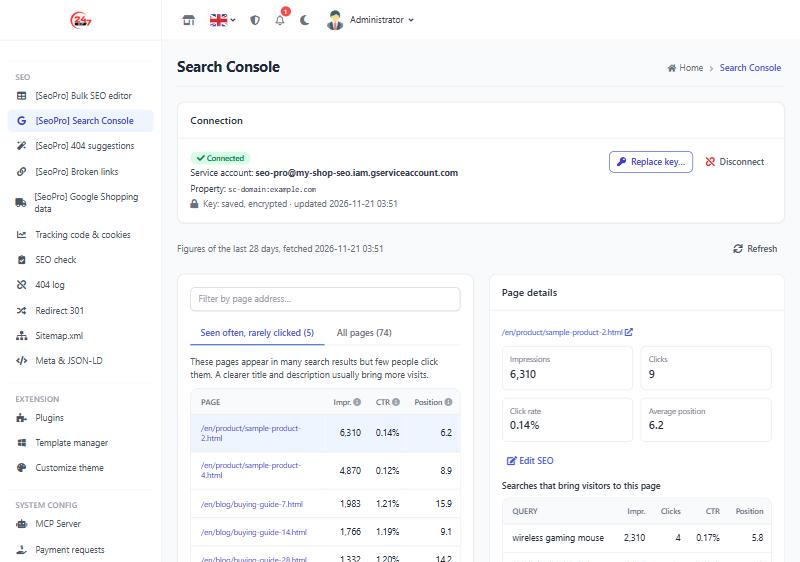
| Search Console | Impressions, clicks, click rate and average position of each page for 28 days, linked to its product. A list of pages shown often but rarely clicked and a list of all pages (filter by address, 50 at a time); click a page and the right-hand column shows its figures, a button to edit its SEO and the searches that bring visitors. |
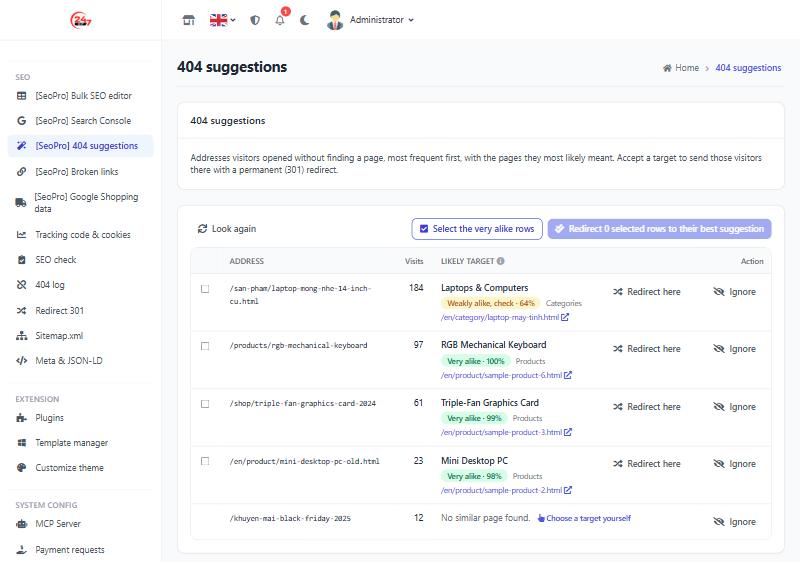
| 404 suggestions | Addresses visitors opened without a page (from the 404 log) with the page they most likely meant (kind, target address, how alike). One click creates a permanent (301) redirect. |
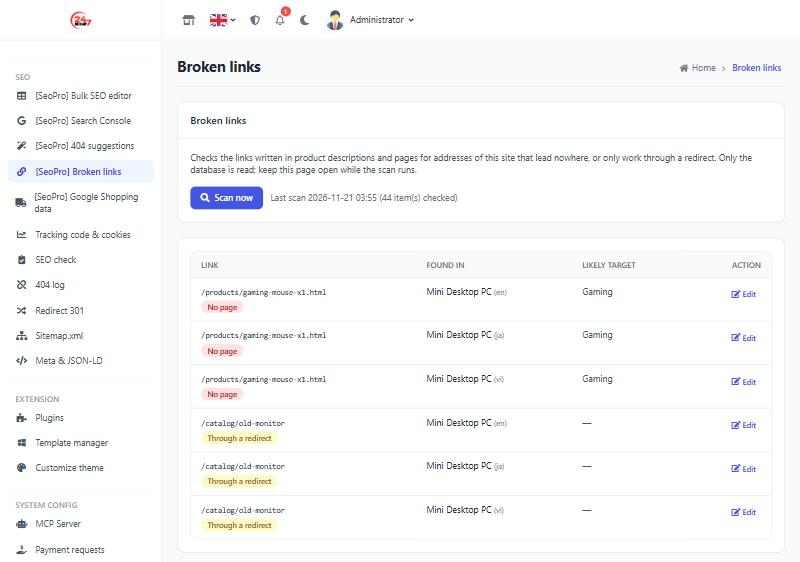
| Broken links | Links in product descriptions and page bodies that lead to an address without a page, or only work through a redirect. |
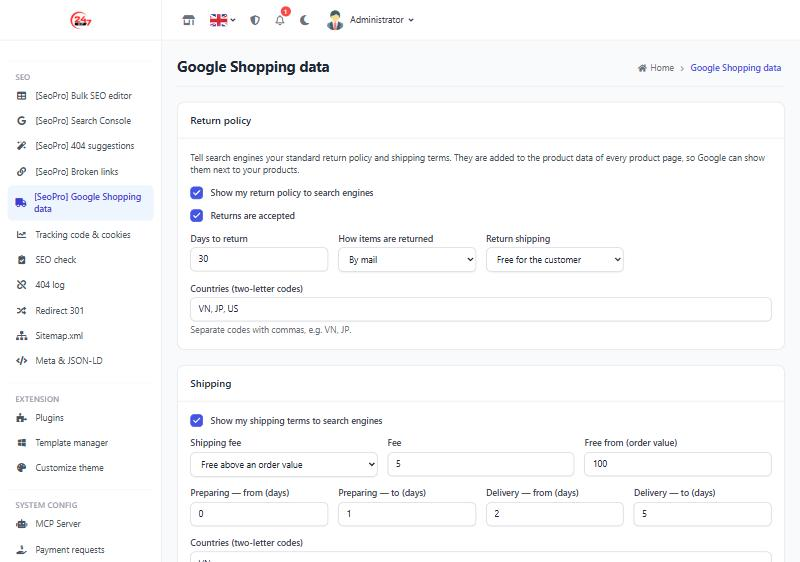
| Google Shopping data | The shop's return policy and shipping terms added to the product data, so Google can show them next to the products. |
No cron or queue: figures are fetched when a screen opens and kept 12 hours, scans run batch by batch in the browser. Works on shared hosting.
Screenshots
Bulk SEO editor
Search Console
404 suggestions
Broken links
Google Shopping data
Requirements
gp247/core3.16 or newer.gp247/frontwith the shared SEO extension points (3.12.1 or newer). When missing, the plugin does not enable and says what to update.gp247/shopfor products and Google Shopping (without the shop it works on content pages only).- PHP with the
opensslextension (Search Console connection).
Install
php artisan gp247:ext-install --type=plugin --key=SeoPro --paid --license=<license key>
Then give your staff access in Admin › Permissions. Each screen has its own permission; connecting or disconnecting Search Console is a separate one. Administrators always have full access.
Connect Search Console
SEO Pro reads the figures with your own service account: a "machine account" you create in Google Cloud that may only read the Search Console figures of the website you allow. No Google app to create, no sign-in again every week, no server in between — the figures go straight from Google to your website.
You need: a Google account that is an Owner of the website's property in Search Console. You do this once; it takes about 10 minutes.
Step 1 — Create a project and enable the Search Console API
- Open the Google Cloud Console with your Google account.
- In the top bar, open the project picker › New project, give it a name you will recognise, for example
my-shop-seo, then Create. An existing project works too. - Go to APIs & Services › Library, search for Google Search Console API and press Enable.
Step 2 — Create the service account and download its JSON key
- Go to IAM & Admin › Service accounts › Create service account.
- Name it, for example
seo-pro, press Create and continue. Skip the role and access steps and press Done — the service account needs no permission in Google Cloud. - Open the new service account › Keys tab › Add key › Create new key › choose JSON › Create.
Your browser downloads a
.jsonfile — this is the key you will paste into SEO Pro. - Note the service account e-mail, such as
seo-pro@my-shop-seo.iam.gserviceaccount.com(theclient_emailline of the file).
Treat the key file like a password. Do not send it by chat or e-mail and never put it in Git. Once connected you may delete the file from your computer; if you ever need it again, create a new key (step 2.3).
Step 3 — Let the service account read the website's Search Console
- Open Search Console and choose the website's property (a Domain property
example.comor a URL prefix propertyhttps://www.example.com/both work). - Go to Settings › Users and permissions › Add user.
- Paste the service account e-mail from step 2.4, choose the Restricted permission (read only) and press Add.
Step 4 — Paste the key into SEO Pro
- In the admin, open SEO › [SeoPro] Search Console.
- Open the
.jsonfile with Notepad (or any text editor), select all of it, copy and paste it into Service account key (JSON). - Leave Property empty — SEO Pro finds the property matching the website's domain. Fill it in only when several properties cover the same
domain and you want a particular one, for example
sc-domain:example.comorhttps://www.example.com/. - Press Connect. On success the screen shows a Connected label, the service account e-mail, the property and "Key: saved, encrypted · updated …", and the figures of the last 28 days are loaded.
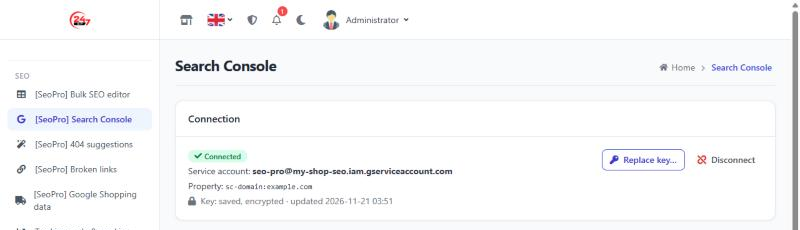
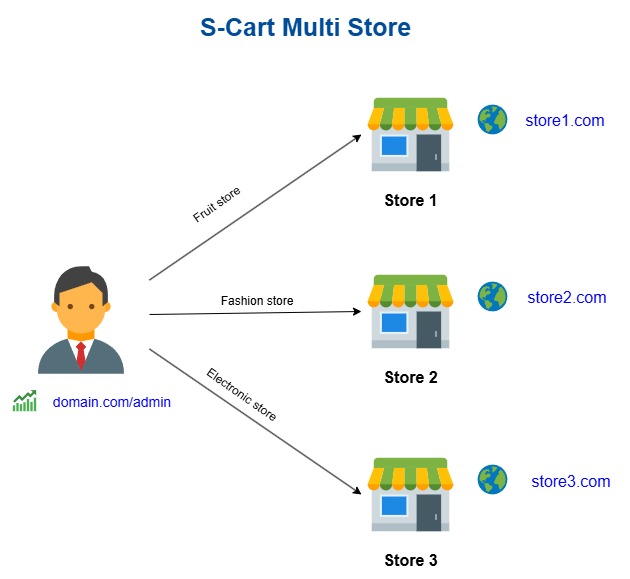
The key is stored encrypted and is never shown again. To change it, press Replace key…, paste the new key and press Connect. Disconnect removes the key and the figures. Multi-store sites: connect each store (each domain) separately.
What the key file looks like
The file Google downloads looks like this (the values are examples, shortened — the private_key of your real file is about 1,700
characters long). SEO Pro uses type, client_email, private_key and token_uri; paste the whole file, do not edit or remove lines.
{
  "type": "service_account",
  "project_id": "my-shop-seo",
  "private_key_id": "3f2a9c0b7e5d41a8b6c2d9e0f1a2b3c4d5e6f708",
  "private_key": "-----BEGIN PRIVATE KEY-----\nMIIEvQIBADANBgkqhkiG9w0BAQEFAASC...(shortened)...\n-----END PRIVATE KEY-----\n",
  "client_email": "seo-pro@my-shop-seo.iam.gserviceaccount.com",
  "client_id": "104857392018475629301",
  "auth_uri": "https://accounts.google.com/o/oauth2/auth",
  "token_uri": "https://oauth2.googleapis.com/token",
  "auth_provider_x509_cert_url": "https://www.googleapis.com/oauth2/v1/certs",
  "client_x509_cert_url": "https://www.googleapis.com/robot/v1/metadata/x509/seo-pro%40my-shop-seo.iam.gserviceaccount.com",
  "universe_domain": "googleapis.com"
}
How to tell it is the right file: it has "type": "service_account", the client_email ends with .iam.gserviceaccount.com, and the
private_key starts with -----BEGIN PRIVATE KEY-----. A client_secret_….json file (from an OAuth client) is not a service account key.
When connecting fails
| Message | Usual cause | What to do |
|---|---|---|
| Not a service account key file | Part of the file is missing, an OAuth client file was pasted, or the file was edited | Paste the whole .json file downloaded in step 2.3 |
| The service account cannot read a Search Console property of the domain … | Step 3 not done, the wrong property, or the website runs on a domain other than the property's (e.g. a local test copy *.local — the real site's key only connects on the real domain) |
Add the service account e-mail to the right property, wait 1–2 minutes and press Connect again |
| Google refused the key | The key was deleted or disabled in Google Cloud | Create a new key (step 2.3) and paste it again |
| Google refused access | The Google Search Console API is not enabled in the key's project (step 1.3), or the service account was removed from the property | Enable the API in that project; check step 3 again |
| Google could not be reached | The server cannot reach the Internet, or Google has a temporary problem | Try again later; ask your hosting provider to allow HTTPS to oauth2.googleapis.com and www.googleapis.com |
Search Console FAQ
- Which day are the latest figures from? Google reports about 2 days late; SEO Pro shows the 28 days ending two days ago.
- How often are the figures refreshed? When the screen opens and the stored figures are older than 12 hours; Refresh fetches them now (at most every 10 minutes).
- A new property has no figures? Search Console needs a few days after verification — the screen says there is no data yet.
- Can SEO Pro change anything in Search Console? No. Access is read only; SEO Pro sends no product, order or customer data to Google.
- Is the key safe? It is encrypted in the database. Set
GP247_ENCRYPTION_KEYin.env: ifAPP_KEYchanges without this dedicated key, the stored key can no longer be decrypted and must be pasted again.
404 suggestions
This screen uses the S-Cart 404 log, which is off by default — turn it on in SEO › 404 log. Redirects follow the S-Cart safety rules (a live page is never taken over, no loops) and show the source "SEO Pro" on the Redirect 301 screen.
Reading a suggestion: page name · kind (Product, Category, Page…) · target address — exactly where the redirect will point, click it to open it in a new tab and check. The % is how alike the words of the end of the broken address and the name / address of the content are — not how sure it is that this is the page the visitor wanted:
| Label | % | What to do |
|---|---|---|
| Very alike | 85 and up | Usually right; redirect them in bulk with Select the very alike rows |
| Alike | 70–84 | Open the target to check, then click |
| Weakly alike, check | 60–69 | Often only one shared word (e.g. a brand name) — check carefully; if wrong, Ignore or Choose a target yourself |
Each row shows its best suggestion; click +N other suggestions to see up to 3. Rows without a suggestion link to the 404 log with Choose a target yourself.
Bulk editing and safety
The bulk editor has no "hide from search engines" or "canonical address" column — one wrong action could remove a whole catalog from Google. These two values are still edited on each product or page.
Uninstall
Removing the plugin keeps its data tables and the Google Shopping settings (a reinstall has them back) and deletes the Search Console key. Titles and descriptions you edited live in the S-Cart SEO data and stay; redirects you created keep working.
License
SEO Pro is commercial software. A license covers one domain and includes updates and support for the period purchased. Redistributing, reselling or sharing the plugin's source code is not allowed. Buy and renew licenses on the SEO Pro product page.
Ratings & reviews
Please sign in to write a review.
LoginNo reviews yet. Be the first to review this product.