

Need it installed?
We set it up and configure it on your server — fixed price after a short quote.
🌐 Language: 🇻🇳 Tiếng Việt · 🇬🇧 English (current) · 🇯🇵 日本語
Data Export for GP247 / S-Cart
A free plugin that takes your shop data out as CSV files: categories, brands, suppliers, products, customers, orders. The files open directly in Excel, can go to your accountant, and import into another GP247 site with the Data Import plugin without mapping a column.
Requirements
| Item | Requirement |
|---|---|
| GP247 core | 3.12 or newer |
| gp247/shop | installed (php artisan gp247:shop-install) |
| Server | runs on shared hosting: no cron, queue or command line needed |
| Shift_JIS encoding | needs PHP mbstring (available on most hosts); without it only UTF-8 is offered |
How to use
- Open System → Data export.
- Choose the data, the filters (creation date, status, payment status, category, store) and the encoding.
- Click Count rows to see how many rows the file will have, then Create file.
- A small file is ready at once. A large file is built in parts while the page stays open (rows written are shown); close the page and it continues when you open it again.
- Click Download. The file is deleted after 24 hours; click Delete file to remove it earlier.
flowchart LR
    A[Choose data + filters] --> B[Create file]
    B --> C{Large file?}
    C -- no --> D[Ready]
    C -- yes --> E[Built in parts while the page is open] --> D
    D --> F[Download within 24 hours]
    F --> G[Deleted]
On a server with a command line (VPS) a run can be built in one go: php artisan data-export:run <run id> (the id is shown on the screen).
Screenshots
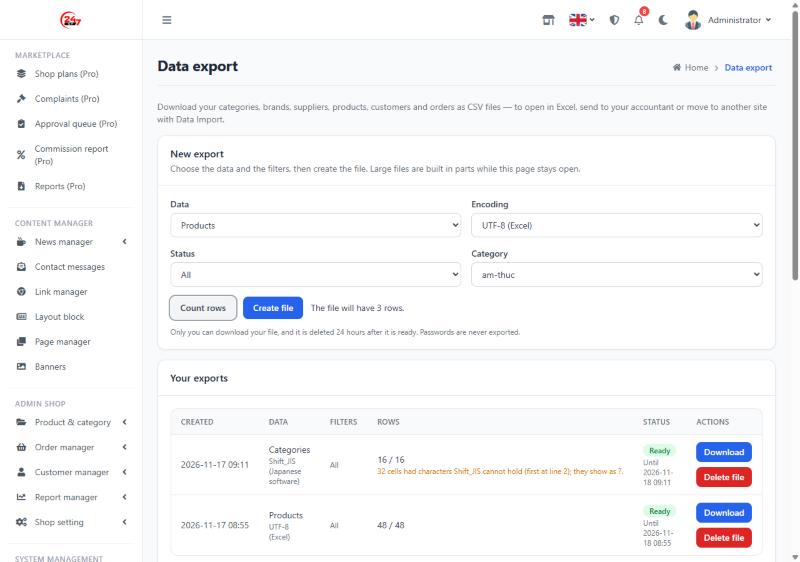
Choose the data, filter by category and see the row count first; the list of files shows how long each can be downloaded and warns when Shift_JIS had to replace characters:
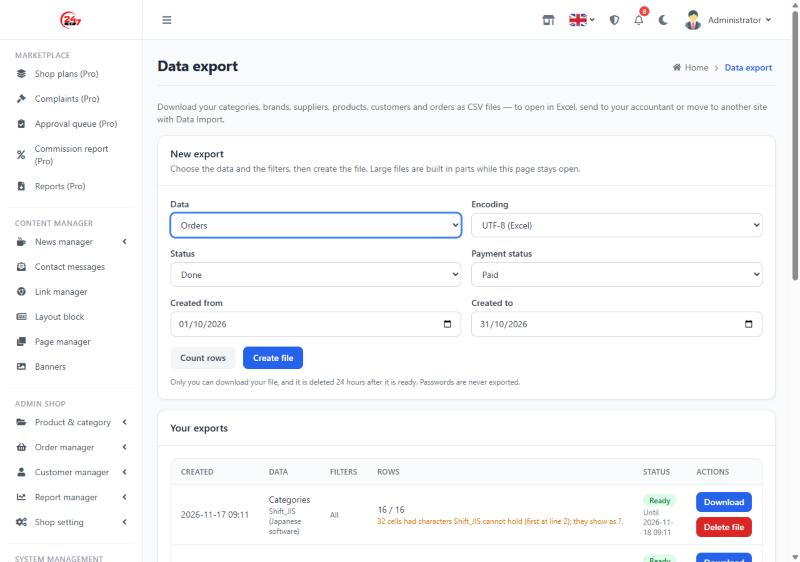
Orders can be filtered by status, payment status and creation dates:
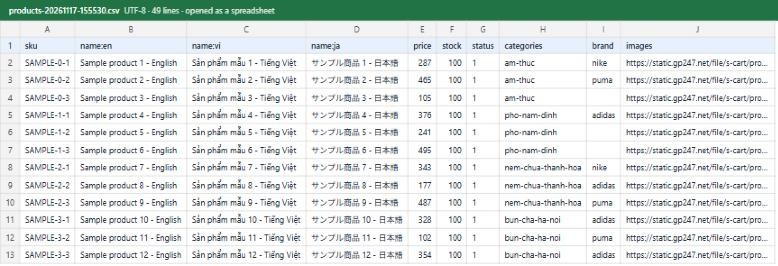
The file opened in a spreadsheet: one column per language, categories and brands by alias, images as full URLs:
Encoding
| Choice | Use it when |
|---|---|
| UTF-8 (Excel) — default | Opening in Excel, Google Sheets or LibreOffice; keeps Vietnamese, Japanese and every other language |
| Shift_JIS | Japanese accounting software or older Excel that only reads Shift_JIS. Characters Shift_JIS cannot hold (Vietnamese accents, emoji…) show as ? and the screen tells how many cells changed. Do not use Shift_JIS files to move a site |
Cells that start with '
A text cell that starts with =, +, - or @ gets a leading ' so a spreadsheet never runs it as a formula (this protects whoever opens the file). Numbers such as -5 stay as they are.
Data Import removes that ' when the file is imported again.
Columns of each kind
Texts per language have one column for every active language, named name:en, name:vi…
| Data | Columns |
|---|---|
| Categories | key (= alias), alias, parent (alias of the parent), name, keyword, description (per language), image, sort, status, top |
| Brands | key (= alias), name, alias, image, url, sort, status |
| Suppliers | key (= alias), name, alias, image, url, email, phone, address, sort |
| Products | sku, alias, name, keyword, description, content (per language), price, cost, stock, minimum, weight, status, sort, tags, categories (aliases separated by |), brand, supplier (aliases), images (full URLs, main image first, separated by |) |
| Customers | email, first_name, last_name, first_name_kana, last_name_kana, phone, company, sex, birthday, group, country, postcode, city, district, ward, address1, address2, address3, status |
| Orders | key (order id), customer (e-mail of the buyer's account), email, first_name, last_name, phone, company, address1–address3, city, district, ward, country, postcode, currency, exchange_rate, payment_method, shipping_method, comment, subtotal, shipping, tax, discount, other_fee, total, received, status, shipping_status, payment_status (status names), created_at, line_sku, line_name, line_price, line_qty, line_total, line_tax, line_tax_rate, line_discount |
- Orders: one row per product line; the order details are on the first row of the order only.
- Products: single products only (no bundles or groups). Rows follow the internal id, not the creation date.
- Never exported: passwords (hashed or not), tokens, two-factor codes, secret settings.
Moving to another GP247 site
- On the old site export, in this order: categories → brands → suppliers → products → customers → orders (use UTF-8).
- On the new site install Data Import and import the files in the same order. Columns match on their own; for orders you only pick the matching statuses.
- Product images are downloaded from the old site by URL — the old site must still be reachable during the import.
Notes:
- Importing categories, brands, suppliers or customers back into the site they came from recognises them (nothing is duplicated). Products with images may show as "Update" because the images are downloaded again.
- Do not import an orders file back into the site it came from — the orders would be created twice.
- Customers on the new site use "Forgot password" to set a new password.
Permissions
| Permission | Allows |
|---|---|
| Data export — open the screen | Open the Data export screen |
| Data export — catalog | Export categories, brands, suppliers, products |
| Data export — customers | Export customers |
| Data export — orders | Export orders |
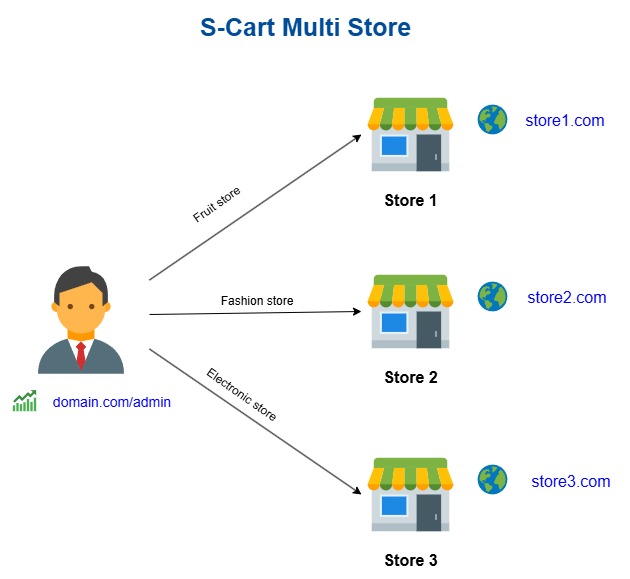
By default only Administrator has them. You can let an accountant export orders without exporting the customer list. On a multi-store site only admins at the root store use this screen (it has a store filter).
Every file created and downloaded is written to the operation log (who, data, filters, rows — never the content of the file).
Uninstall
Uninstalling deletes every export file left on the server, the menu entry and the plugin's permissions. The list of runs (which holds no customer data) is kept.
Release history
Versions and changes: Release history.
License
MIT — free for every GP247 / S-Cart site.
Ratings & reviews
Please sign in to write a review.
LoginNo reviews yet. Be the first to review this product.