Need it installed?
We set it up and configure it on your server — fixed price after a short quote.
🌐 Language: 🇻🇳 Tiếng Việt · 🇬🇧 English (current) · 🇯🇵 日本語
MultiVendor — Multi-vendor marketplace for S-Cart (Free) · MultiVendorPro (Pro)
🚀 Link MultiVendor PRO: https://gp247.net/en/product/multi-vendor-pro.html
Introduction
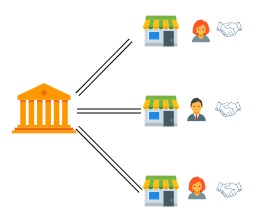
MultiVendor turns an S-Cart website into a multi-vendor marketplace on a single domain: vendors (vendors) list their products on one shared storefront, shoppers buy from several vendors in one visit, and the marketplace collects the payment, then pays each vendor back after keeping a commission. This page is for business owners and S-Cart site owners deciding whether to open a marketplace: what the plugin does, what Free gives you and what Pro adds. It is the entry point to the detailed documents below.
What the plugin does
MultiVendor lets several vendors trade on one website of yours. Each vendor gets their own store page and their own admin area, posts their own products and handles their own orders.
Shoppers buy the way they always do: they put goods from several stores in one cart and pay once — the system splits that into one order per store.
You keep the money and the control: the marketplace collects from the shopper, keeps a commission, then pays each vendor per period; you decide who may sell and which products go live.
Pro adds the tools you need once the marketplace gets busy: vendor plans, clawback when an order is refunded, disputes, identity verification, reporting and wholesale ordering for dealers.
In detail
Features marked Pro need MultiVendorPro installed next to the free plugin — see MultiVendor Pro on gp247.net.
Selling on the marketplace
| Feature | What it does | Edition |
|---|---|---|
| Store directory and store pages | /shop lists every store; each store has its own page at /shop/{code} with cover, logo, banners, its own categories and three tabs — Products · Reviews · About |
Free |
| Vendor label on products | Product cards show the name and icon of the store selling them | Free |
| Cart split per store | Shoppers buy from several stores in one checkout; the system creates one order per store | Free |
| Public trust signals | Complaint rate, typical handling time, share of complaints and reviews answered; computed over 90 days, hidden until the store has enough orders | Free |
| Wholesale for dealers | A quick-order page per store (paste a "SKU, quantity" list, re-order a previous order, export a quote to Excel); dealer price groups each store sets for itself; store staff typing an order for a customer at that customer's own price | Pro |
Money flow
| Feature | What it does | Edition |
|---|---|---|
| The marketplace collects | Only the owner configures payment gateways; vendors never take money from the shopper directly | Free |
| Payout ledger per period | Completed orders are gathered per period: the amount owed after commission, the vendor's payout account, the transaction reference; pay a period through a payment request of gp247/shop (preparer and payer have separate permissions, the row is marked paid automatically) |
Free |
| Marketplace-wide commission | One rate applied to every store | Free |
| Commission per store | Resolved in order: the store's own rate → its plan's rate → the marketplace rate | Pro |
| Vendor plans | A product cap, a plan commission and a periodic fee deducted straight from the next payout — a second income stream next to commission | Pro |
| Batch payouts | One bank instruction file for many stores, plus Excel statements both sides can reconcile against | Pro |
| Automatic clawback | An order you already paid out, later refunded or cancelled, creates a negative row offset against the next period | Pro |
| Reporting | Orders per store; commission per store and per period, exportable to Excel | Pro |
Control and operations
| Feature | What it does | Edition |
|---|---|---|
| Dedicated vendor admin | /vendor_admin: dashboard, products, categories, banners, suppliers, orders (tracking code, packing slip), store info, payout history |
Free |
| Vendor and product moderation | Allow or block self-registration; auto-approve or approve by hand, per store and per product | Free |
| Approval queue | Stores, products and verification profiles in one screen; a rejection needs a reason and is logged | Pro |
| How far a vendor may move an order | The owner chooses: shipping status only · plus confirming the order · plus completing it | Pro (Free stays at confirm + shipping) |
| Two-step disputes | The customer opens one under their order; the vendor answers first, the marketplace decides last; the refund is booked straight into the order | Pro |
| Identity verification (KYC) | Profiles stored encrypted, a "verified" badge; optionally hold products and payouts until verification is done | Pro |
| Vendors configure their own plugins | Shipping, promotions… within what the marketplace opens; payment gateways always stay with the marketplace | Pro |
| E-mail notifications | Free: the vendor is e-mailed on a new order. Pro: adds store approval, payout, adjustment and dispute mails, plus pending-review mails to the marketplace | Free · Pro |
👉 See it running on the public demo: https://m-vendor.s-cart.org
How MultiVendor differs from Multi-Store
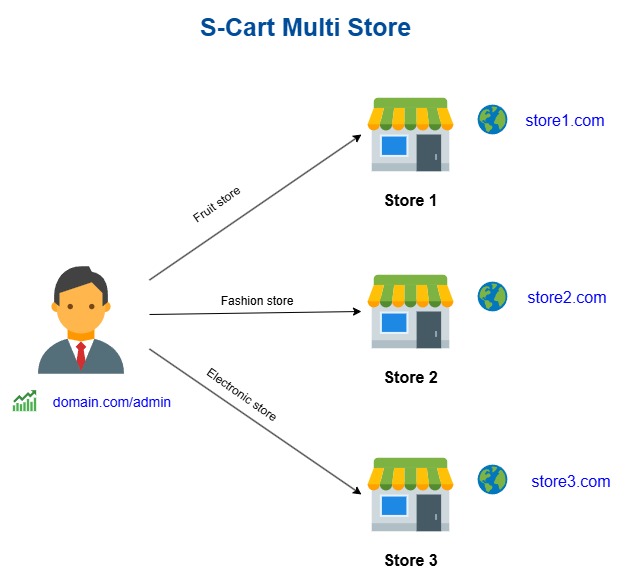
Both plugins talk about "many stores", but they are two different business models, and they cannot be installed together on one website (the installer refuses, to keep the shared store data intact). Pick the right one before you start:
| Criterion | 🛒 Multi-Vendor (this plugin) | 🏢 Multi-Store |
|---|---|---|
| Who owns the goods | Independent vendors trading on your marketplace | One owner — your own business |
| Model | Marketplace | A chain of stores / several brands of the same owner |
| Domains | One domain; each store is a page at /shop/{code} |
One domain per store |
| Who lists products | Each vendor lists their own, the marketplace approves | You do, choosing which store a product belongs to |
| Money flow | The marketplace collects, keeps a commission and pays vendors per period | The money is yours, nothing is shared |
| Who signs in to administer | Vendors use their own /vendor_admin, scoped to their store |
You (plus per-store administrators in Multi-Store Pro) |
| Right for you when | You want to invite other people to sell and earn a commission | You want several websites/domains for one business |
In one line: Multi-Vendor is a marketplace for other people's shops; Multi-Store is several shops of your own. If every product is yours and you only need more domains, use Multi-Store instead: gp247.net/en/product/multi-store-pro.html.
Documentation
The detailed guides live on the GP247 documentation site — one source, always the current version:
| Document | Contents |
|---|---|
| Marketplace overview | Operating model, the key workflows (diagrams), who can do what |
| Setup | Install S-Cart 3.x, install and enable the plugin, create the first shop, sample data, verify |
| Operations | Every marketplace setting (with its admin_config key), money and payouts, moderation, disputes, verification |
| Customisation | Change wording, replace views in a template, developer hooks |
| Release history | Versions and changes |
| Pro product page | gp247.net — MultiVendor Pro |
| Vietnamese version of this README | README_vi.md |
Free vs Pro
Who buys Pro: the marketplace owner. Vendors and customers never pay anything to GP247 and never see an upgrade offer — the Free edition shows the owner where each Pro feature would live, and one click explains it.
Free is a working marketplace for up to 3 vendors. Pro is a second plugin installed on top of Free (MultiVendorPro, requires MultiVendor): install it and every locked entry opens the real screen — nothing is reinstalled, no data moves, and the tables Pro created are kept if you ever remove it.
🚀 Link MultiVendor PRO: https://gp247.net/en/product/multi-vendor-pro.html
| MultiVendor (Free) | MultiVendorPro (Pro) | |
|---|---|---|
| Vendor stores | up to 3 | unlimited |
| Store page, directory, trust signals, cart split per vendor | yes | yes |
| Commission | one marketplace rate | + a rate per vendor and a rate per plan |
| Vendor plans (product cap, plan commission, periodic fee netted from payouts, self-service plan choice) | — | yes |
| Payout ledger per period | yes | + vendor payout account (encrypted), Excel statements for both sides, bank instruction file per batch with one-click batch settlement |
| Clawback after payout (refund / cancel of an order already paid) | — | automatic, netted into the next period |
| Disputes / refund requests through the marketplace | — | two-step desk: vendor answers, marketplace decides, refund booked on the order |
| Vendor identity verification (KYC) | — | encrypted profile, verified badge, optional hold on products and payouts |
| Moderation | via store and product lists | approval queue for vendors, products and identity profiles; rejection with a logged reason |
| Vendor order handling | shipping status | + confirm / complete presets, chosen by the marketplace |
| Vendor types an order for a customer | — | yes, prices filled in from the customer's price group |
| Vendor price groups (dealer discounts per customer group) | — | yes, a signed-in customer sees only their own price |
| Vendors answer the reviews of their store | — | yes (with the ProductRating plugin) |
| Vendors configure allowlisted store plugins (shipping, promotions…) | — | yes; payment gateways stay with the marketplace |
| B2B quick order per store (SKU list, paste, re-order, Excel quote) | — | yes |
| Reports (orders by store) and commission report per vendor per period, Excel export | — | yes |
| E-mails | vendor: new order | + vendor approved, payout done, clawback, identity decision, dispute steps; marketplace: pending review |
| Support | community | GP247 paid channel |
Requirements
- S-Cart 3.x with
gp247/core3.1 andgp247/shopinstalled. - Not installed together with the MultiStore plugin (the two models are mutually exclusive).
- Runs on ordinary shared hosting: no cron, no queue worker, no websocket needed.
Install from the command line (CLI, gp247 3.x)
Since gp247 3.x you can download MultiVendor from the GP247 library and install it straight from the command line, without opening the admin. Open a terminal in the website's root folder and run:
# 1) Once per website: register the (free) API License that connects the site to the GP247 library
php artisan gp247:ext-register-license

# 2) Download the plugin from the library and install it
php artisan gp247:ext-install --type=plugin --key=MultiVendor
- Before step 1, make sure
APP_URLin.envis the website's real domain (nothttp://localhost) — the license is bound to that domain. - Once installed, the plugin is enabled and caches are refreshed automatically; nothing else is needed in the admin.
- The command checks the requirements declared in
gp247.json(core 3.1,gp247/shop, required plugins, the rule against installing alongside MultiStore) and stops with a clear message if something is missing. - If the plugin folder is already in
app/GP247/Plugins/(copied manually or unpacked from the zip), the command installs it in place instead of downloading it again. - The command refuses a plugin that is already installed. To move to a newer version, run
php artisan gp247:ext-update --type=plugin --key=MultiVendor. - Append
--jsonto get machine-readable output (for scripts/CI). - More: Extension installation guide.
Q&A
Q1: How is MultiVendor different from Multi-Store?
→ Multi-Store = one domain per store, all goods your own. MultiVendor = one shared marketplace on one domain, external vendors register to sell, the marketplace collects payment and pays commission. The full comparison is in How MultiVendor differs from Multi-Store; the two plugins cannot be installed together.
Q2: Do vendors get a separate website or domain name?
→ No. Every store lives on the marketplace domain, reached at /shop/{store-code}.
Q3: Who collects the customer's money?
→ The marketplace. Vendors never enter payment-gateway keys; the marketplace pays vendors per period after keeping its commission (see "Vendor payout process" in the detailed guide).
Q4: Can I start on Free and move to Pro later without losing anything?
→ Yes. Pro installs on top of Free; stores, vendors, orders and the payout ledger stay where they are. Per-vendor rates you had set on Free are kept and start applying once Pro is installed.
Q5: Do vendors or customers ever see a price or an upgrade button?
→ No. Only the marketplace administrator sees Pro entries; a vendor who reaches a Pro feature is told it is part of the marketplace's Pro edition and to ask the marketplace.
Q6: Where can I try it before deciding?
→ The public demo marketplace: https://m-vendor.s-cart.org — open a store page, the directory and the buying flow as a real shopper would.
📅 Last updated: 2026-10-22 · ✍️ Author: GP247
Ratings & reviews
Please sign in to write a review.
LoginNo reviews yet. Be the first to review this product.
![[InOut] Purchase, Return, Cash Flow Management Plugin](https://static.gp247.net/product/in-out.png)