

Need it installed?
We set it up and configure it on your server — fixed price after a short quote.
VnpayPayment Plugin
🌐 Language: 🇻🇳 Tiếng Việt · 🇬🇧 English (current) · 🇯🇵 日本語
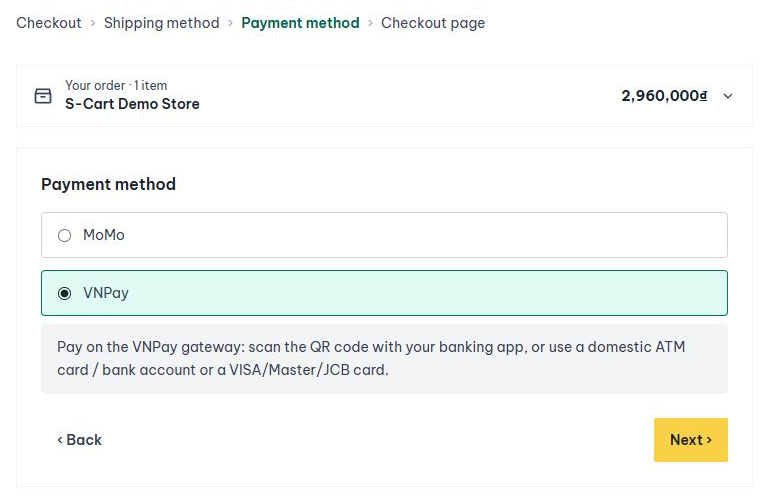
Accept payments through the VNPay gateway in an S-Cart store: QR code scanned with a banking app, Vietnamese ATM cards / bank accounts, and VISA/Master/JCB cards. Shoppers pay on VNPay's page and come back to the store — card details never pass through your website.
Overview
| Plugin | VnpayPayment |
| Version | 1.0.1 |
| Developer | GP247 |
| License | Free · open source, MIT |
| Requires | GP247 Core 3.15+ · package gp247/shop · an active VND currency |
| Does not need | New Composer packages, cron, queue — runs on shared hosting |
Features
- One VNPay payment page for every method: bank QR, ATM card / domestic account, international card.
- Money is recorded on the order exactly once, even when the shopper closes the browser before coming back (VNPay reports the result to the site — IPN) or VNPay sends the notification several times.
- Every result from VNPay is checked against its signature with the store's hash secret; a result without a valid signature is ignored.
- A failed or cancelled payment cancels the order and returns its stock.
- Payment links (the shop's payment requests) paid through VNPay.
- One VNPay account per store; the hash secret is encrypted in the database and never shown again.
- A Check before use box on the settings screen: what still stops shoppers from paying with VNPay, and where to fix it.
Installation
- Copy the
VnpayPaymentfolder intoapp/GP247/Plugins/on the website (or upload the ZIP file at Admin → Extensions / Plugins → Import). - Go to Admin → Extensions / Plugins, find VNPay and click Install.
The plugin is enabled once installed, but it can only take money after you enter your VNPay account (next section).
Configuration
Go to Admin → Payment → VNPay. The screen has four blocks:
| Block | Content |
|---|---|
| Mode | On = use the Sandbox block (no real money); Off = the Live block. This block also shows the website's payment result URL (IPN). |
| Sandbox | Website code (vnp_TmnCode) and hash secret (vnp_HashSecret) of the test environment. |
| Live | Website code and hash secret VNPay issues after the contract is signed; the payment page address of the production environment. |
| Orders | Order status after a payment / after a full refund. |
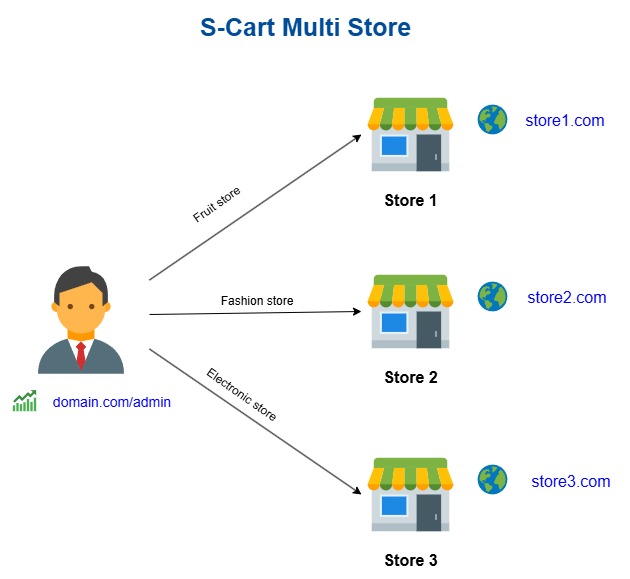
On a site with several stores, pick the store at the top of the screen to enter its own account; a store without one uses the shared account.
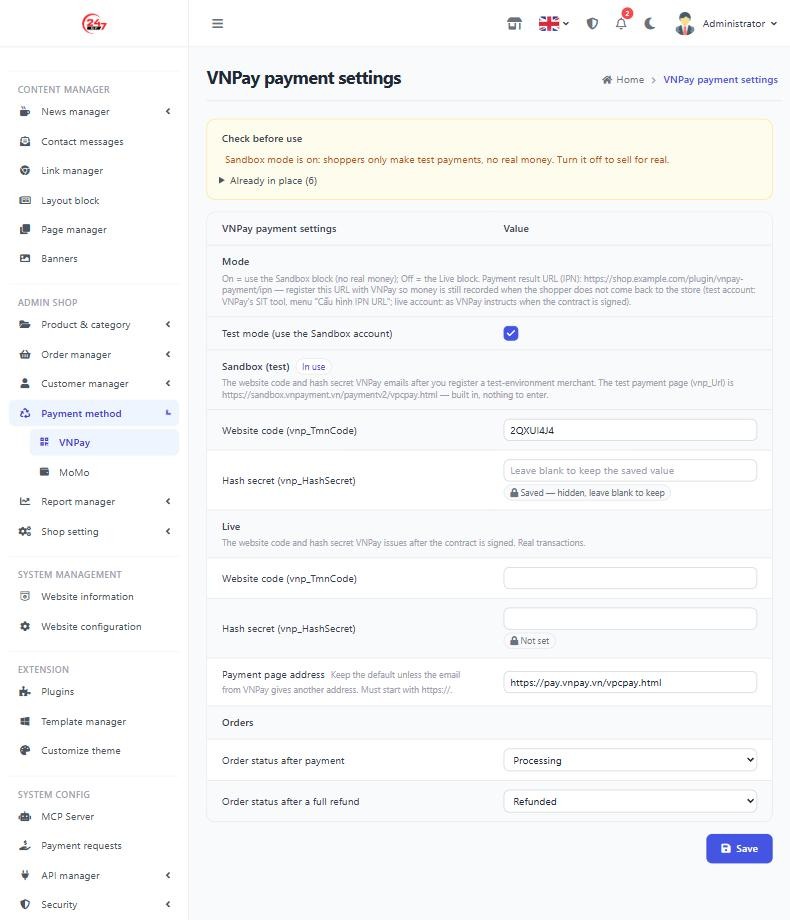
Register the payment result URL (IPN) with VNPay
VNPay does not take this URL with each transaction: you register it once per website code. Copy the URL from the
Mode block (it looks like https://your-domain/plugin/vnpay-payment/ipn). The URL must be on a public domain with
HTTPS.
- Test account (Sandbox): sign in to VNPay's SIT testing tool (its address is in the registration email; use the same email and password you registered with), open the Cấu hình IPN URL menu, click Sửa on the row of your website code, paste the URL and click Cập nhật.
- Live account: register this URL with VNPay as instructed when the contract is signed.
While this URL is not registered (or the site runs on a personal computer), money is still recorded when the shopper comes back to the store; only shoppers who close the browser right after paying depend on the IPN.
Try it on the Sandbox
- Register a test account at https://sandbox.vnpayment.vn/devreg/ (the "test-environment merchant" form: website name, website address, email, password). VNPay emails the website code and the hash secret, together with the addresses of the test environment's transaction admin site and SIT testing tool.
- Turn Test mode on, paste the two values into the Sandbox block and save.
- Place an order in VND and choose VNPay. On VNPay's page choose a domestic card, bank NCB, and use the test card VNPay publishes:
Card number:   9704198526191432198
Card holder:   NGUYEN VAN A
Issue date:    07/15
OTP:           123456
More test cards (insufficient balance, locked card, international cards…) are on VNPay's demo page
(sandbox.vnpayment.vn/apis/vnpay-demo/). No real money is charged.
Go live
- Sign the contract with VNPay and complete VNPay's acceptance test; VNPay issues the website code, the hash secret and the production addresses.
- Paste the website code and hash secret into the Live block. Compare the payment page address in that block with the email from VNPay — change it only if the email gives an address other than the default.
- Register the payment result URL (IPN) for the production website code, then turn Test mode off.
Refunds
The plugin does not yet send refund commands to VNPay from the shop's admin screens. To give money back to a shopper, arrange the refund with VNPay (on VNPay's transaction admin site or through VNPay support), then record that refund on the order screen by hand — VNPay does not notify the website about refunds.
Notes
- Currency: VNPay only accepts VND. An order in another currency cannot open VNPay; the shopper is asked to choose another method.
- The VNPay payment page of each order is valid for 15 minutes.
- A result whose amount differs from the order total is not recorded on the order; the order gets a history line so you can check it with VNPay.
- A transaction VNPay reports as "money deducted but suspected of fraud" is not recorded automatically; the order gets a history line so you can reconcile it with VNPay and record it by hand.
- In the order's payment ledger, each VNPay payment carries the reference the plugin sent to VNPay (
vnp_TxnRef); VNPay's own transaction number is in the note. - Uninstalling the plugin removes only its settings; payments and refunds already recorded on orders stay.
Official VNPay documentation this plugin was designed from
The plugin is based on VNPay's public integration documentation, API 2.1.0, read on 24 November 2026, and passed all 6 test cases of VNPay's SIT testing tool (24 November 2026):
| Page (sandbox.vnpayment.vn/apis/docs/) | The plugin relies on it for |
|---|---|
thanh-toan-pay/pay.html |
Parameters and the HMAC-SHA512 signature of the payment request, the Return URL and the IPN; the IPN answer codes |
bang-ma-loi/ |
The meaning of the result codes |
Release history
- 1.0.1 — Answers to VNPay (IPN) match VNPay's SIT test suite: a confirmed transaction received again with a different amount is still reported as "invalid amount", and the answers use the exact wording VNPay expects. All 6 SIT test cases pass.
- 1.0.0 — First release: VNPay payment page (QR, ATM, international cards), signature-checked Return URL and IPN, payment links through VNPay, per-store settings, encrypted hash secret, check-before-use box.
Ratings & reviews
Please sign in to write a review.
LoginNo reviews yet. Be the first to review this product.