SEO Pro — plugin for S-Cart
Core 3.16+
 [GP]247
Need it installed?
We set it up and configure it on your server — fixed price after a short quote.
🌐 Language: 🇻🇳 Tiếng Việt · 🇬🇧 English (current) · 🇯🇵 日本語
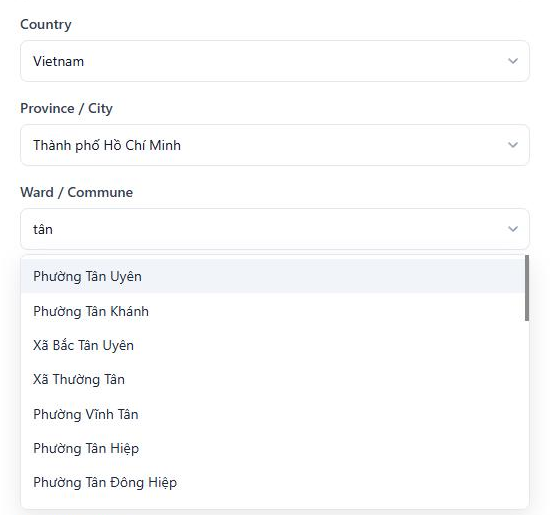
Customers pick their Province / City, then their Ward / Commune, from a list when they register, edit their address book and check out on an S-Cart store — instead of typing them. Addresses are stored with the official name plus the administrative unit code, so every customer no longer writes the same place a different way ("Q.1", "Quận 1", "quan 1").
The list follows Vietnam's two-level administrative units (province → commune, since 2025-07-01) published by the General Statistics Office, and ships inside the plugin.
| Plugin | AddressVN |
| Version | 1.0.0 |
| Developer | GP247 |
| License | Free · open source, MIT |
| Requires | GP247 Core 3.18+ · package gp247/shop 3.15+ |
| Not needed | New Composer packages, cron, queue, an Internet connection at run time |
| Data | 34 provinces / cities · 3,321 wards / communes / special zones — list dated 2026-11-24 |
AddressVN folder to app/GP247/Plugins/ on the website (or upload the ZIP file at
Admin → Extensions / Plugins → Import).The plugin is enabled right after installation. A site not yet on gp247/shop 3.15 gets a message asking to update
S-Cart first (composer update, then php artisan gp247:update).
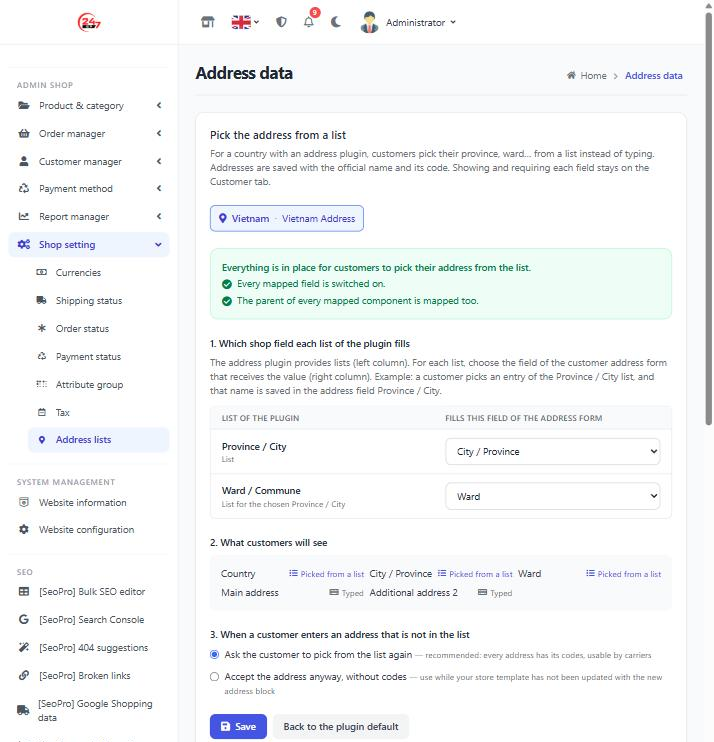
Click the plugin's settings button, or go to Shop setting → Address lists (also under Website configuration → Address tab) and choose Vietnam. The screen has three steps:
The check panel at the top lists anything still missing, with a button to the place to fix it. The usual one: on Website configuration → Customer tab, switch on the Province / City and Ward fields (and Country if you sell to several countries), and switch off District — Vietnam dropped the district level on 2025-07-01 (keep it if you also sell to a country that needs it).
Uninstalling the plugin keeps the settings of this screen — reinstall and carry on.
Administrative boundaries change by resolution of the National Assembly. Each plugin release states the date of its list (Overview table). When a release with a newer list is out, update the plugin like any other — saved addresses are not changed.
Maintainers rebuild the data file with the command shipped in the plugin:
php app/GP247/Plugins/AddressVN/tools/build-catalog.php <file.xls> <YYYY-MM-DD>.
The command stops without writing anything when the file has an unexpected row (wrong header, duplicate code, a
province with two names).| Source | Version / date | Used for |
|---|---|---|
| Administrative unit list — General Statistics Office of Viet Nam, commune level, Excel export | In force on 2026-11-24 · 34 provinces, 3,321 commune-level units (709 wards, 2,599 communes, 13 special zones) | Official codes and names of provinces / cities and wards / communes / special zones (Data/vn-admin-units.json) |
Please sign in to write a review.
LoginNo reviews yet. Be the first to review this product.