SEO Pro — plugin for S-Cart
Core 3.16+
 [GP]247
Need it installed?
We set it up and configure it on your server — fixed price after a short quote.
🌐 Language: 🇻🇳 Tiếng Việt · 🇬🇧 English (current) · 🇯🇵 日本語
Customers in Japan type their postal code (郵便番号) and the prefecture (都道府県), city / ward (市区町村) and town (町域) fill in — they only add the block number and building. This is how people in Japan expect to enter an address when they shop online, now on your S-Cart store.
The postal code data is the official file of Japan Post, shipped inside the plugin: no outside service is called, no Internet connection or cron is needed, and no customer data leaves your site.
| Plugin | AddressJP |
| Version | 1.0.0 |
| Developer | GP247 |
| License | Free · open source, MIT |
| Requires | GP247 Core 3.18+ · package gp247/shop 3.15.1+ |
| Not needed | New Composer packages, cron, queue, an Internet connection at run time |
| Data | 47 prefectures · 120,721 postal codes — Japan Post file of 2026-10-23 |
100-0001, 1000001, full-width 100-0001, with a
leading 〒.NNN-NNNN and the official names of prefecture, city / ward and town with the prefecture and
local government codes (JIS), for shipping plugins and reports. A postal code that
does not belong to the chosen prefecture, or has the wrong number of digits, is flagged on the Postal code field.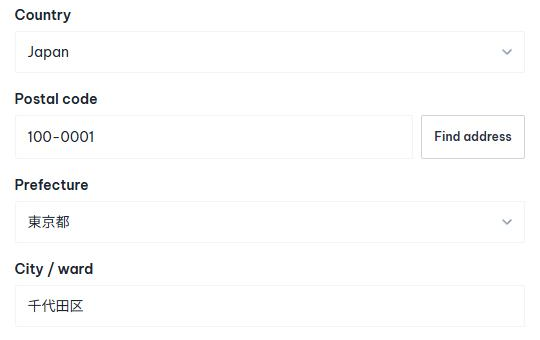
AddressJP folder to app/GP247/Plugins/ on your website (or upload the ZIP file at
Admin → Extensions / Plugins → Import).The plugin is enabled right after installation. A site not yet on gp247/shop 3.15 gets a message to update S-Cart first
(composer update, then php artisan gp247:update).
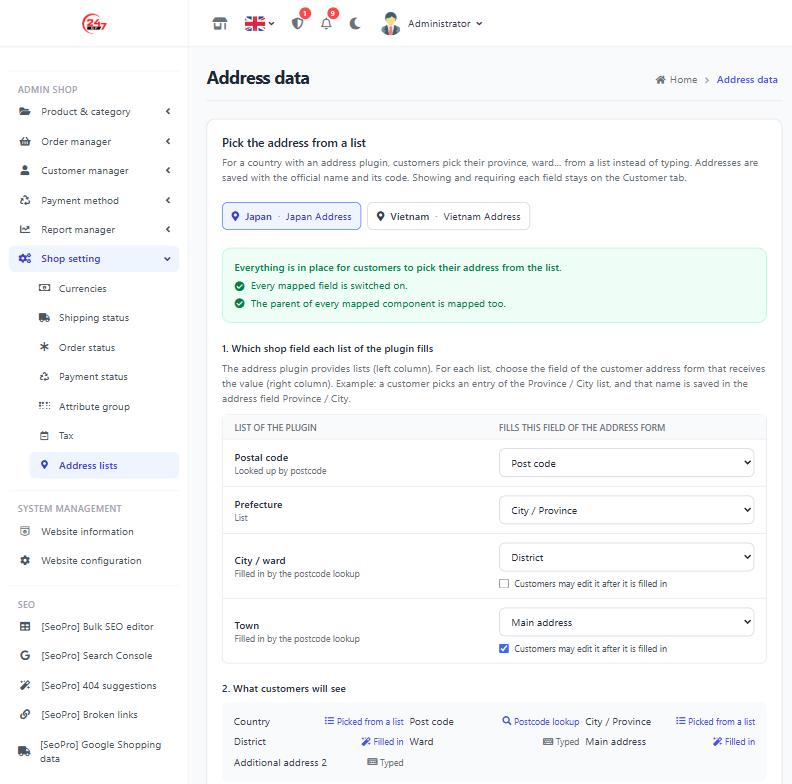
Click the plugin's settings button, or go to Shop setting → Address lists and choose Japan. Defaults:
| The plugin provides | Fills the field |
|---|---|
| Postal code (郵便番号) | Post code — placed right after Country |
| Prefecture (都道府県) | City / Province |
| City / ward (市区町村) | District |
| Town (町域) | Main address — the customer adds the block number and building |
The check panel at the top lists anything still missing, with a button to the place to fix it. The usual one: on Website configuration → Customer tab, switch on the Post code, City / Province, District and Country fields. If you switched District off (for example because Vietnamese addresses no longer have districts), switch it back on or send City / ward to another field — otherwise that part is not saved.
Uninstalling the plugin keeps the settings of this screen — reinstall and carry on.
Japan Post updates its postal code data every month. Each plugin release states the date of its data (Overview table); when a new release comes out, update the plugin like any other — saved addresses are not changed.
Maintainers rebuild the data with the command shipped in the plugin:
utf_ken_all.zip (住所の郵便番号 — 1レコード1行、UTF-8形式) from
Japan Post's postal code download page.php app/GP247/Plugins/AddressJP/tools/build-postcodes.php <utf_ken_all.zip> <YYYY-MM-DD>
(date of the file). The command stops without writing anything if a row looks wrong (column count, a code with the wrong
number of digits, an unknown prefecture).| Source | Version / date | Used by the plugin for |
|---|---|---|
Postal code data — Japan Post, utf_ken_all.zip |
2026-10-23 · 47 prefectures, 120,721 postal codes, 124,527 rows | Postal codes, prefectures, cities / wards (JIS codes), towns (Data/) |
Japan Post claims no copyright on its postal code data and allows free redistribution. The plugin cleans town names for
customers: placeholder rows (以下に掲載がない場合…) become empty and notes in parentheses ((1〜19丁目), (1階)…) are
dropped.
Please sign in to write a review.
LoginNo reviews yet. Be the first to review this product.