


🌐 Language: 🇻🇳 Tiếng Việt · 🇬🇧 English (current) · 🇯🇵 日本語
Safe production configuration — the .env file, HTTPS and the server
Introduction
This page shows how to configure a GP247 site that is live (production) so it stays safe: the .env file, debug mode, HTTPS,
cookies, the web root, folder permissions and Docker. The page is for technical staff, and for site owners who install on their own
hosting. After reading it you will have a table of correct values for each variable, know what happens when one is wrong, and know how to self-check in 5 minutes.
ℹ️ What is the
.envfile: a text file in the site's root folder that holds the site's own settings: the database password, the encryption key, the run mode… Anyone who can read this file can read every secret of the site.
At a glance
Four configuration layers must be right at the same time; one wrong layer means a hole:
flowchart LR
    A["Web server<br/>HTTPS, public/ folder"] --> B[".env file<br/>production, debug off"]
    B --> C["Code install<br/>no dev packages, config cache"]
    C --> D["Folder permissions<br/>storage, bootstrap/cache"]
- Three required lines in
.env:APP_ENV=production,APP_DEBUG=false,APP_URL=https://…. - The web root (document root) must be
public/— if it points to the project root, the.envfile may be downloadable through a browser. .env.exampleis a template for developer machines (APP_ENV=local,LOG_LEVEL=debug) — do not use it as-is for a live site.- After editing
.env, runphp artisan config:clearif the site uses a config cache.
On this page
- Environment variables for production — correct values and what happens when they are wrong
- Why debug must never be on for a live site
- HTTPS and cookies
- Security headers — switch each header on or off, HSTS, emergency switch
- Site behind a proxy or CDN —
TRUSTED_PROXIESfor each way of running the site - Web root and folder permissions
- Installing the code for production
- Running with Docker
- Self-check in 5 minutes
Environment variables for production
This table lists the security-related variables, the value to set for a live site, and what happens if the value is wrong.
| Variable | Production value | Default (.env.example / system) |
If wrong |
|---|---|---|---|
APP_ENV |
production |
local |
GP247 only forces debug off when the value is exactly production |
APP_DEBUG |
false |
false |
If on, error pages show config, paths and queries to everyone |
APP_URL |
https://your-domain |
http://localhost |
Links in emails and payment links are wrong, or point to http:// |
APP_KEY |
A unique key, never changed once the site is running | (created at install) | Changing it signs everyone out and breaks webhook secrets — see Encryption keys & backup |
GP247_ENCRYPTION_KEY |
A unique key, set right after install | (empty) | If empty, secrets are tied to APP_KEY; gp247:doctor check encryption_key_dedicated will remind you |
LOG_LEVEL |
warning or error |
debug |
debug writes a lot of detail into the log; the file grows large and holds information you do not need |
SESSION_SECURE_COOKIE |
true (once HTTPS is on) |
(not set) | The sign-in cookie may be sent over an unencrypted connection |
GP247_ADMIN_PREFIX |
Your own path, e.g. admin-7k2 |
gp247_admin |
Automated scanners find the default path first |
GP247_FINGERPRINT |
false if you do not want to advertise the platform |
true |
The site returns a header and a meta tag saying it uses GP247 |
TRUSTED_PROXIES |
Empty, or the IP ranges of every proxy in front, in one value | (empty) | REMOTE_ADDR or * lets anyone fake their IP; missing while a proxy is in front makes every visitor the same IP — see Site behind a proxy or CDN |
DB_PASSWORD |
A strong password, unique to this site | password |
A sample password everyone knows |
GP247_API_MODE |
0 if you use neither the REST API nor MCP |
1 |
Not an error — but turning off unused parts closes one more door |
GP247_SECURITY_HEADERS |
1 (set 0 only during an incident) |
1 |
0 means the site sends no security header — see Security headers |
💡 Tip: generate a random key value with
php artisan key:generate --show— the command only prints the key on screen and changes nothing.
Why debug must never be on for a live site
Debug mode is for development: when an error happens, the page shows every detail so the developer can fix it. On a live site, any visitor who hits an error sees those details: folder paths on the server, database queries, part of the configuration. Attackers cause errors on purpose to read them.
- What GP247 protects: when
APP_ENV=production, GP247 forces debug off whateverAPP_DEBUGsays; the admin header shows a red "DEBUG ON" label when debug is on. - What you do: set both
APP_ENV=productionandAPP_DEBUG=false. If you see the "DEBUG ON" label on a live site, fix.envright away and runphp artisan config:clear. - Need to see errors on a live site? Read the
storage/logs/gp247.logfile instead of turning on debug.
HTTPS and cookies
HTTPS encrypts the connection between the browser and the site, so passwords and sign-in cookies cannot be read on the way. GP247 does not turn on HTTPS by itself — you must turn it on in your hosting or web server.
-
Turn on an SSL certificate in the hosting control panel (most offer free Let's Encrypt), or configure it in the web server / proxy.
-
Turn on the
http://→https://redirect in the same place. -
Edit
.env:APP_URL=https://your-domain SESSION_SECURE_COOKIE=true -
If the site uses a config cache, run:
php artisan config:clear -
(Recommended) Once HTTPS works on every page, turn on HSTS on the Security headers screen so browsers always use HTTPS — see Security headers.
If it worked, opening the site with http:// redirects to https:// and the browser shows a padlock icon.
Security headers
Security headers are instructions the site sends with every page so the browser blocks common attacks. GP247 sends four of them, switched on or off on the Security headers screen (menu System config → Security, visible to Administrators only). The setting applies to the whole site.
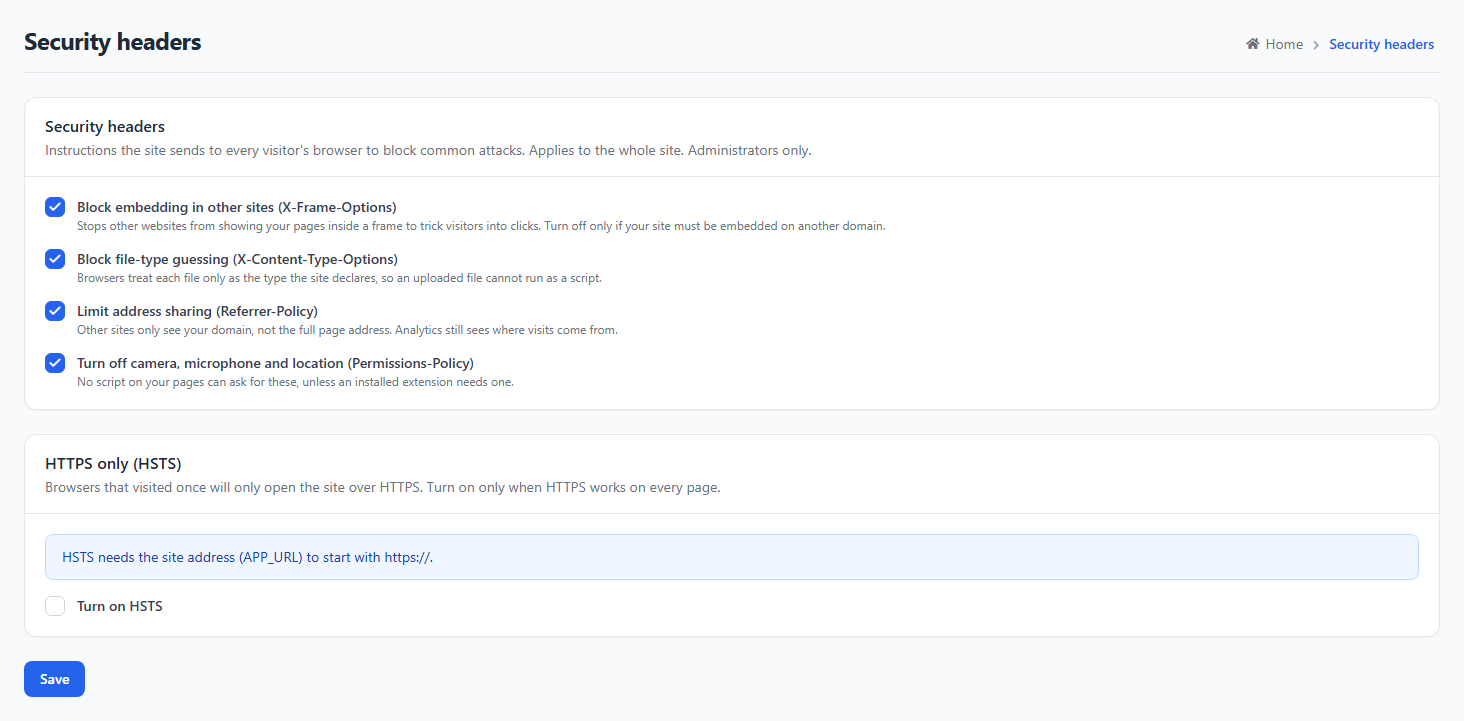
| Header | What it does | When to turn it off |
|---|---|---|
| X-Frame-Options | Other sites cannot show your pages inside a frame to trick visitors into clicks | When your site must be embedded on another domain |
| X-Content-Type-Options | Browsers treat each file only as the type the site declares — an uploaded file cannot run as a script | Almost never |
| Referrer-Policy | Other sites only see your domain, not the full page address; analytics still sees where visits come from | When a partner service needs the full address |
| Permissions-Policy | No script on your pages can ask for the camera, microphone or location — except what an installed extension needs | When you embed a tool that needs these yourself |
HSTS (HTTPS only) — off by default. A browser that visited once will only open the site over HTTPS for the period you choose, and turning HSTS off later does not reach those browsers. Turn it on safely:
- Check that HTTPS works on every page, including subdomains if you plan to tick "Also every subdomain".
- On the Security headers screen, turn HSTS on with 5 minutes and save — the screen asks for confirmation first.
- After a few days without trouble, raise it step by step: 1 day → 1 week → 1 month → 6 months → 1 year.
- Tick preload only when every subdomain will run HTTPS for good — preload needs "Also every subdomain" and a period of at least 1 year.
GP247 refuses to turn HSTS on when APP_URL does not start with https://, and only sends HSTS on HTTPS requests.
Emergency switch — a setting broke the admin and you cannot reach the screen to fix it: set GP247_SECURITY_HEADERS=0 in .env
and run php artisan config:clear. The site stops sending every security header (HSTS included); remove the variable once the screen is fixed.
The web server or CDN already sends headers — GP247 never overwrites a header the application or a plugin set, but it cannot see the ones the web server or CDN adds after it. When both send one, browsers receive two copies, and switching it off on the screen has no effect. Pick one place: turn it off in the web server, or turn that header off on the screen. Check what really reaches the browser with:
php artisan gp247:doctor --probe-headers
The security_headers_live row reports a missing header, a header sent twice, or a header switched off that still arrives. The command opens the
home page exactly once; when the hosting blocks a site from calling itself, the row says "could not check" — not an error.
ℹ️ Available since: gp247/core 3.16.0
Site behind a proxy or CDN
GP247 takes the IP and the scheme (https) from forwarded headers only when the request comes from a proxy listed in TRUSTED_PROXIES.
The domain in links always comes from the real Host header — GP247 never uses X-Forwarded-Host.
| How the site runs | TRUSTED_PROXIES |
|---|---|
| Hosting / VPS, the web server receives visitors directly | Leave empty |
| Behind Cloudflare / a load balancer | Its IP ranges (presets in .env.example) |
| Docker, nothing in front | Leave empty |
| Docker behind nginx / Caddy / Traefik on the same server | 172.16.0.0/12, plus SC_DOCKER_APP_PORT=127.0.0.1:8000 |
| Docker behind nginx / Caddy / Traefik on the same server, and that server behind Cloudflare / a load balancer | Both in one value: 172.16.0.0/12,<Cloudflare / LB ranges>, plus SC_DOCKER_APP_PORT=127.0.0.1:8000 (the full line is ready in .env.example) |
List every hop, in one value. GP247 reads forwarded headers only when the proxy connected straight to the site is listed, then skips each listed hop in turn to find the visitor's real IP. Leaving one hop out is the same as listing nothing.
-
Never use
REMOTE_ADDRor*: when the web server talks to PHP over FastCGI (including the nginx of the Docker stack),REMOTE_ADDRis the visitor's own address, so anyone can fake their IP. The System alerts page andphp artisan gp247:doctorreport thetrusted_proxiesitem for these values. -
The proxy in front must keep the
Hostheader (nginx:proxy_set_header Host $host;). -
Missing while a proxy is in front: every visitor shows the same IP (the sign-in limit shares one counter) and links are generated as
http://. On an HTTPS site the browser also blocks actions in the admin pages and reports "Mixed Content" in the Console. The System alerts page andphp artisan gp247:doctor(itemtrusted_proxies) remind you when the admin pages are opened through a proxy you have not listed, with that proxy's address.ℹ️ Available since: gp247/core 3.11.3
-
Container port open to the server only: with
172.16.0.0/12listed and the container port open to the outside, anyone who calls that port directly counts as a proxy and can fake their IP — the server firewall does not cover Docker ports. Check withss -ltnp | grep 8000: the right result shows only127.0.0.1:8000, no0.0.0.0or[::]. -
Docker network in another range:
172.16.0.0/12covers the usual Docker networks, but a server running many stacks may get192.168.x.x. Read the real subnet (replacescartwith yourSC_DOCKER_INSTANCE) and list that one:docker network inspect scart-prod_scart -f '{{range .IPAM.Config}}{{.Subnet}}{{end}}'.
Web root and folder permissions
This section stops sensitive files (.env, logs, backups) from being downloaded directly through a browser.
- The document root must point to the site's
public/folder, not the project root. Everything outsidepublic/(including.env,storage/,vendor/) is then not reachable from the web. - Shared hosting with only
public_html: put the code outsidepublic_htmland copy only the contents ofpublic/intopublic_html; or change the domain's document root to…/publicin the control panel. - Write permissions: only
storage/andbootstrap/cache/need write access (plusapp/GP247/andpublic/GP247/if you install plugins from the admin). Do not set777on the whole site. - Quick check: open
https://your-domain/.envin a browser. The correct result is a 404 or 403 error. If you see the file's contents — fix the document root right away and change every password in the file.
Installing the code for production
This section is for sites installed with Composer, Git or Docker.
- Install without development packages: use
composer install --no-dev. Dev packages (e.g. the debug toolbar) are not needed on a live site. - Never push
.envto Git: check that.gitignorehas a.envline. If it was already pushed, treat every secret in the file as leaked — change them all (see Updates & incidents). - Config cache (
php artisan config:cache) makes the site faster, but after that every time you edit.envyou must runphp artisan config:clear(orconfig:cache) again. Otherwise the site keeps the old values — including the oldAPP_DEBUG. - Do not delete the
storage/app/private/folder: it holds the site's "installed" marker.
Running with Docker
The S-Cart Docker setup has a few built-in protections for production:
docker-compose.prod.ymlpinsAPP_ENV=productionandAPP_DEBUG=falsefor every PHP service, no matter what.envon the machine says.- Refuses to start while the sample passwords from
.env.exampleremain (DB_PASSWORD=password,SC_DOCKER_DB_ROOT_PASSWORD=change_me_rootwhen using the bundled MySQL). - nginx blocks hidden files (
.env,.git) and internal folders; PHP turns off unused features. - Page security headers come from GP247 — the bundled nginx only adds
X-Content-Type-Optionsto static files, so switching headers on the Security headers screen really takes effect. If you editeddefault.confyourself, merge this change when you update.
Your part: put HTTPS at the proxy in front of the containers (the bundled nginx only listens on port 80), change every sample password, and update images following
the "Security updates" section of DOCKER.md. Never run
docker compose down -v on a production machine — that command deletes the volume that holds the database. With an HTTPS proxy on the
same server, set TRUSTED_PROXIES as in Site behind a proxy or CDN.
Self-check in 5 minutes
Do these in order; each step has a correct result to compare against.
-
Admin: sign in and look at the header — the environment label must be production, with no red "DEBUG ON" label. On an Administrator account, the System alerts block at the top of the dashboard must report no critical issue (details on the System alerts page).
-
Browser: open
http://your-domain— it must redirect tohttps://. -
Browser: open
https://your-domain/.env— it must be a 404 or 403 error. -
Command line (if you have it): run the command below; every line must be PASS, or a WARN whose reason you understand:
php artisan gp247:doctorPay attention to the
encryption_key_dedicatedandsecret_decryptablelines — see Encryption keys & backup.
ℹ️ Info:
gp247:doctorchecks the PHP environment, write permissions, the encryption key, the database and (on an installed site) the same items as the System alerts block: debug turned on (app_debug),APP_URLnot starting withhttps://orSESSION_SECURE_COOKIEnot turned on (https), the defaultadminpassword, MFA, the support end date of the version line. The command reads the configuration and does not open the site over the network, so it cannot tell whetherhttp://redirects tohttps://or whether.envcan be downloaded — steps 2–3 above do that. The only exception: with--probe-headersit opens the home page once to read the security headers that really reach the browser (rowsecurity_headers_live).ℹ️ Available since: gp247/core 3.10.0 (the System alerts block and page, the security checks of
gp247:doctor); gp247/core 3.16.0 (--probe-headers)
Conditions & Rules (know before you act)
GP247_DB_PREFIXcannot be changed after install — if you change it, the site cannot find its data tables.- Changing
GP247_ADMIN_PREFIXchanges the admin address — tell every administrator the new address; old bookmarks will break. - Setting
SESSION_SECURE_COOKIE=truebefore HTTPS is on means no one can sign in — turn on HTTPS first. - Editing
.envwhen the config is cached — you must runphp artisan config:clearfor the change to take effect. APP_ENVis case-sensitive —Productionorprodis not treated as production.
Q&A
Q1: What if I leave APP_ENV=local on a live site?
→ GP247 does not force debug off, so only APP_DEBUG protects you. Change it to production and run php artisan config:clear.
Q2: I set APP_DEBUG=false but the header still shows "DEBUG ON"?
→ The site is using an old config cache. Run php artisan config:clear. Without a command line, delete the bootstrap/cache/config.php file through your hosting's file manager.
Q3: I can open /.env in a browser. What do I do?
→ Fix the document root to the public/ folder right away, then treat every secret in the file as leaked: change the database password, the SMTP password and the payment gateway keys. See Updates & incidents.
Q4: Can changing GP247_ADMIN_PREFIX replace a strong password?
→ No. It only makes it harder for automated scanners to find the admin. Strong passwords and two-factor authentication are the real protection.
Q5: My shared hosting does not let me change the document root?
→ Move the code outside public_html and copy only the contents of the public/ folder into public_html. Ask your provider if the control panel has no such option.
Q6: Is LOG_LEVEL=debug dangerous?
→ Nothing leaks outside as long as storage/ is not reachable from the web, but the log grows large and holds lots of details you do not need. Set warning or error for a live site.
Q7: Docker already pins APP_DEBUG=false. What else do I need to worry about?
→ HTTPS at the proxy in front, changing sample passwords, updating images regularly, and backing up the database volume.
Q8: Why not just set TRUSTED_PROXIES=* to save time?
→ Then anyone can fake their IP address through a header, which makes the per-IP sign-in limit and the IP log worthless. REMOTE_ADDR does the same when PHP runs over FastCGI. Only list the IP ranges of the real proxy.
📅 Last updated: 2026-11-20 · ✍️ Author: GP247